顯示具有 lighttpd 標籤的文章。 顯示所有文章

8/15/2007

Fedora Core 6 上安裝 beast (2)

不喜歡 apache 嗎?apache 沒辦法用 mod_proxy_balancer 嗎?沒關係,我找到另外一個不錯的方式了,是 pound + lighttpd. 如果不想用 apache 的話,上一篇的 httpd 相關的東西都不要灌,改灌:

sudo yum install Pound
sudo yum install lighttpd

我是覺得這邊分大小寫很沒意義,不過 yum 就是這樣﹍。

pound 是什麼?
The Pound program is a reverse proxy, load balancer and HTTPS front-end for
Web server(s). Pound was developed to enable distributing the load among
several Web-servers and to allow for a convenient SSL wrapper for those
Web servers that do not offer it natively.

lighttpd 我想大家都知道,一個非常快速的 http server, 只不過他的 mod_proxy 似乎有很多問題,以致於沒辦法用他。所以這部份用 pound 當前端解決這個問題,流程變成:

http request => pound => lighttpd or mongrel cluster

安裝好後,先來設定 pound, 不過 https 就先暫時略過不管。
sudo nano /etc/pound.cfg
=========================
User "pound"
Group "pound"

ListenHTTP
    Address 0.0.0.0
    Port 80
End

Service
    URL "/(images|stylesheets|javascripts)/"
    BackEnd
        Address 127.0.0.1
        Port    1999
    End
    Session
        Type    BASIC
        TTL     300
    End
End

Service
    BackEnd
        Address 127.0.0.1
        Port    2000
    End
    BackEnd
        Address 127.0.0.1
        Port    2001
    End
    BackEnd
        Address 127.0.0.1
        Port    2002
    End
    Session
        Type    BASIC
        TTL     300
    End
End
=========================
前面的設定是把 host/images, host/stylesheets, host/javascripts 這三個 url 下的 request 都丟給 port 1999 處理,也就是等會 lighttpd 要使用的 port. 這邊使用 regex, 可以自由設定自己要的規則。假使未來 user 要使用 file_column, 可以再加個 user/avatar 之類的。

下面的則是全部丟給 mongrel_cluster 處理。設定上應該比 apache 簡單地多。可以先測試看看,先把 lighttpd 的部份 comment 起來,啟動 pound 試試:
sudo pound

照理說這樣就能使用了。不行的話加個 config 檔路徑給他:
sudo pound -f /etc/pound.cfg

這邊我是在想要不要把 config 也放到 beast 裡面,不過 pound 應該只會有一個,所以我想還是放到 /etc 下好了。停止 pound 的方式:
sudo kill `sudo cat /var/run/pound.pid`

製作 lighttpd 設定檔:
nano config/lighttpd.conf
==========================
server.modules = (
"mod_access",
"mod_accesslog"
)

server.port = 1999
server.bind = "127.0.0.1"
server.document-root = "/home/YOUR_NAME/projects/beast/stable-1.0/public"

server.username = "YOUR_NAME"
server.groupname = "YOUR_NAME"
server.pid-file = "/home/YOUR_NAME/projects/beast/stable-1.0/tmp/pids/lighttpd.pid"
server.errorlog = "/home/YOUR_NAME/projects/beast/stable-1.0/log/lighttpd_error.log"
index-file.names = ( "index.html", "default.html" )
accesslog.filename = "/home/YOUR_NAME/projects/beast/stable-1.0/log/lighttpd_access.log"

# mimetype mapping
mimetype.assign = (
".rpm" => "application/x-rpm",
".pdf" => "application/pdf",
".sig" => "application/pgp-signature",
".spl" => "application/futuresplash",
".class" => "application/octet-stream",
".ps" => "application/postscript",
".torrent" => "application/x-bittorrent",
".dvi" => "application/x-dvi",
".gz" => "application/x-gzip",
".pac" => "application/x-ns-proxy-autoconfig",
".swf" => "application/x-shockwave-flash",
".tar.gz" => "application/x-tgz",
".tgz" => "application/x-tgz",
".tar" => "application/x-tar",
".zip" => "application/zip",
".mp3" => "audio/mpeg",
".m3u" => "audio/x-mpegurl",
".wma" => "audio/x-ms-wma",
".wax" => "audio/x-ms-wax",
".ogg" => "application/ogg",
".wav" => "audio/x-wav",
".gif" => "image/gif",
".jpg" => "image/jpeg",
".jpeg" => "image/jpeg",
".png" => "image/png",
".xbm" => "image/x-xbitmap",
".xpm" => "image/x-xpixmap",
".xwd" => "image/x-xwindowdump",
".css" => "text/css",
".html" => "text/html",
".htm" => "text/html",
".js" => "text/javascript",
".asc" => "text/plain",
".c" => "text/plain",
".cpp" => "text/plain",
".log" => "text/plain",
".conf" => "text/plain",
".text" => "text/plain",
".txt" => "text/plain",
".dtd" => "text/xml",
".xml" => "text/xml",
".mpeg" => "video/mpeg",
".mpg" => "video/mpeg",
".mov" => "video/quicktime",
".qt" => "video/quicktime",
".avi" => "video/x-msvideo",
".asf" => "video/x-ms-asf",
".asx" => "video/x-ms-asf",
".wmv" => "video/x-ms-wmv",
".bz2" => "application/x-bzip",
".tbz" => "application/x-bzip-compressed-tar",
".tar.bz2" => "application/x-bzip-compressed-tar"
)
==========================
我很想省略 mime-type 設定,不過不設的話 firefox 好像會有問題。safari 和 opera 是 ok 的,IE 我沒得測就沒測了。反正要設就是了,有沒有問題不影響。只是希望 lighttpd 能內建這些設定﹍。

啟動 lighttpd
sudo lighttpd -f config/lighttpd.conf

這樣就算大功告成了!剛剛有測試 pound 的話記得改回原本設定並重新啟動。比較詳細的介紹與說明可以參考這篇:
Configuring pound with lighttpd and mongrel.

*

summary:

用到的 server:

(1)
apache2.2 =>
reverse proxy + load balancer + serve static files

(2)
pound => reverse proxy + load balancer
lighttpd => serve static files

(3)
mongrel_cluster => setup mongrel cluster
mongrel => serve beast

結果就是 ((1) or (2)) + (3)

操作 apache:
啟動:sudo apachectl start
停止:sudo apachectl stop
重啟:sudo apachectl restart

操作 pound:
啟動:sudo pound -f /etc/pound.cfg
 或:sudo /etc/init.d/pound start

停止:sudo kill `sudo cat /var/run/pound.pid`
 或:sudo /etc/init.d/pound stop

重啟:sudo /etc/init.d/pound restart

操作 lighttpd:
啟動:sudo lighttpd -f config/lighttpd.conf
 或:sudo /etc/init.d/lighttpd start

停止:sudo kill `cat tmp/pids/lighttpd.pid`
 或:sudo /etc/init.d/lighttpd stop

重啟:sudo /etc/init.d/lighttpd restart

操作 mongrel_cluster:
啟動:sudo mongrel_rails cluster::start
停止:sudo mongrel_rails cluster::stop
重啟:sudo mongrel_rails cluster::restart

操作 postgresql:
啟動:sudo pg_ctl start
停止:sudo pg_ctl stop
重啟:sudo pg_ctl restart

3/07/2007

Lighttpd 佔有率暴漲

Lighttpd 佔有率這個月突然暴漲,在Netcraft二月的時候佔有率是第六名,數量是 702712。這個月突然 Double 起來,數量是 1399786,佔有率是第五名。目前輸給 Apache,IIS,SUN-One-Web-Server ,當然還有一個 Unknown。以這個上漲聲勢來看,有機會成為 Apache,IIS 以下第三大 Web Server。


12/30/2006

Ruby on Rails 伺服器架設原理

一般來說,Ruby on Rails 架設原理很簡單,分成三個部份。
  1. Frontend Server
  2. Application Server
  3. Database Server
每個部份都有自己的功用。


Frontend Server 負責將所有 HTTP Request forward 給後端的 Application Server,也就是他是作類似 Reverse proxy 的工作。一般來說,Apache 2.2 跑 mod_reverse_proxy 是最常出現的選擇,nginx 也是不錯的選擇。Lighty 1.5 之後跑 mod_proxy_core 也很方便,等到 1.5 release 之後我會作詳細的評估。
Application Server 負責跑 Ruby on Rails 程式,你寫好的程式就在上面跑。一般來說可以用 Webricks,Fastcgi,scgi,Mongrel 等等 Ruby on Rails Runner來跑。Webricks 太慢,Fastcgi 有穩定性,以及不好設定的疑慮。SCGI 太年輕。目前最穩,最好用,而且已經被驗證過的 Application Server 就是 Mongrel。

Database Server 就是處理資料處理的工作。可以跑 SQLite,MySQL 之類的 RDBMS 。甚至使用 File 來當資料處理,或是使用 NFS 也未嘗不可。不過這裡通常大家都是使用一般大廠的 RDBMS資料庫。

組合方式

Apache 2.2 + Mongrel:穩定,高彈性的組合

Apache 2.2 遇到 user request 用 HTTP 分配給 Mongrel ,然後 Mongrel 去跑。這個組合的好處是每個 Application Server node 都可以很輕易的拆成不同台機器,並且很好管理。Apache 的穩定又是出名的。雖然不見得最快,但是方便 scale 以及穩定是他最好的優點。目前所有組合當中最穩定的方式,很多流量最大的 Ruby on Rails 站台也都是使用這個方式。適合在已經有一定規模的網站。設定方式在此我有介紹。

Lighttpd + Fastcgi:單機最佳選擇
Lighttpd 1.4 跑 PHP 或是跑 Ruby on Rails 都是這樣跑。Lighttpd 為 Frontend Server ,他接到 request ,經由 unix socket 送給身為 Application Server 的 Fastcgi ,Fastcgi 再執行 Ruby on Rails 程式。通常這個方式是 Frontend Server 跟 Application Server 跑在同一個機器上面的,當然每個 Fastcgi 也可以跑在 TCP Mode ,然後 Fastcgi 放在不同機器上面,不過設定不易不常使用這個方式。這個組合的好處是執行效率非常快速,如果 Frontend 跟 Application 放在同一台機器上,Lighty 這個組合遠比 Apache 的組合來得輕快許多。但是缺點是多台機器設定複雜,不易擴展到多台機器上,Fastcgi 又有在高負載下罷工的負面報導。相反的,單台機器上面 Fastcgi 設定管理簡單,速度又飛快,非常適合小網站剛剛起步時,機器不足,流量不大的需求。設定方式在此我有介紹。

Nginx or Lighttpd 1.5 + Mongrel:未來的新選擇

類似Apache 的組合,但是 nginx 或是 Lighttpd 1.5 都有一個優點,不像 Apache 2.2 那麼肥。反正這個 Frontend 只要作 reverse proxy 的工作,其實不需要 Apache 那麼大的 Server 來作。好處是 Frontend Server 比較快速。壞處是 nginx 這個俄國來的 Server 大家不熟悉,doc 又很少(俄文是很多啦)。Lighttpd 1.5 又只在 pre-release 階段,穩定程度還是得花點時間。不過如果扣掉 Frontend 的 X factor,這個組合兼具輕快跟方便 Scale ,可說是最好的組合。lighty 1.5設定方式在此我有介紹。nginx 的設定檔這裡有範例,可以參考。


12/29/2006

跑 Lighttpd 的5 大網站

取材自Lighttpd 作者 Blog,在 Alexa 上面的 Top 250 網站已經有 5個是跑 Lighttpd,我們來看看這幾個網站怎麼使用 Lighttpd。以下排行都是 Alexa 排行。

  1. 第6名: youtube使用 Lighttpd 來serve static content,像是 images,video。不過他們的流量太大了,所以使用 patch version 的 lighttpd 來加強。
  2. 第12名:wikipedia 使用 lighttpd 處理所有的 image work,像是縮圖之類的。
  3. 第80名:SourceForge 是完全使用 Lighttpd ,包含 PHP,以及 static content
  4. 第132名:sendspace.com 是一個巨量的 file sharing 網站,他們是使用 Lighttpd。
  5. 第221名:mininova 是一個 Torrent Download 網站。

根據 Netcraft 的 2006/12 報告,一共有
178619 個網站使用 Lighttpd,佔 12位。我們發現到 Lighttpd 其實已經不少巨量網站採用,實在是個好消息。


LightyPHP:Windows 上面的 lighttpd 懶人包

今天看到 LightyPHP 這個套件,裡面寫到
LightyPHP是一個包含PHP和lighttpd的軟體包裝,讓你輕鬆的在Windows 2000/XP上建立PHP伺服器
也就是一個類似 Appserv 的套件包,不過他跑的是 Lighty + PHP + SQLite。他的目的也在 FAQ 寫了
特別聲明, LightyPHP並不適合用作為伺服器軟體, Windows作業系統也不是伺服器的好選擇。 LightyPHP的設定是以容易使用為主,並不是為了要當作網站伺服器。
恩,作者的觀念也是正確的。除了 Windows 下面沒辦法跑 Fastcgi ,所以得用 CGI 去跑 PHP 以外,沒啥好挑剔的工具。


12/26/2006

Ubuntu 上面安裝 Lighttpd + phpmyadmin

這是今天安裝 Ubuntu 6.10 時的紀錄,畢竟 phpmyadmin 是一個誰都得使用的套件,還是得記錄一下。想看 Ruby on Rails 的文章的人可以自動略過去,另外這裡有 Ubuntu 安裝 lighty + RoR 詳細版以及精簡版的。

  1. 安裝 lighttpd (註1)
    apt-get install lighttpd
  2. 安裝 php5-fastcgi mode (註2)
    apt-get install php5-cgi php5-mysql libfcgi-dev
  3. 修改 Lighttpd config 成 Enable mod_fastcgi
    /usr/sbin/lighty-enable-mod fastcgi
    /etc/init.d/lighttpd force-reload
  4. 安裝 phpmyadmin
    apt-get install phpmyadmin
註.
  1. lighttpd 1.4.13 是放在官方套件沒錯,但是是屬於 universe 的,得先將 source.list 裡面 universe 打開
  2. PHP4 Fastcgi 似乎有問題,只好灌較肥的 PHP5

Update: 本文章同步發表至 ubuntu@tw 論壇

延伸閱讀


11/28/2006

Comet on Lighttpd

Comet 果然是開始慢慢發酵,Lighty 作者 Jan 也開始對 Comet 有興趣了。
Can I use it ?
Not yet. This is a idea how to implement COMET in a nice, performing fashion. On the way to 1.5.0 it will be implemented. Meanwhile I’m looking for comments on the idea and if it matches your needs for COMET and AJAX.
他還沒決定怎麼作,不過可以確定的是事情是他會在 1.5 上面 implement ,implement 方式可能是採用 mod_multiplex 或是 mod_mailbox 方式來作。

至於 Comet 可以拿來作的東西,AJAX 也都做得到。但是有些程式的架構本身就比較適合 Server Push ,而不適合 Polling。像是聊天室,IM等程式都是廣泛的 Comet 應用,期待 Lighty on Comet 的到來。

11/12/2006

Lighttpd 1.5 + Linux Async IO

出自Lighttpd 的作者 Jan 發表的 Benchmark,發現到當使用 Lighttpd 1.5(還在 trunk 階段)裡面最新的 Linux Async IO ,不管是小 file benchmark ,還是大 file benchmark,會有將近 80% 的效能進步。
1.5.0 will be a big win for all users. It will be more flexible in the handling and will have huge improvement for static files thanks to async io.
為什麼會有那麼大的進步,其實我不清楚細節,畢竟我本身對這方面沒有研究,不過根據 GSlin的說法
async I/O 將 read request 丟給 kernel 後先去做其他事情,等到 kernel 處理完以後再用 callback routine 告訴 lighttpd 已經完成讀取。這使得 kernel 可以最佳化讀取的順序以達成 I/O 效率的提升,另外一方面 lighttpd 也可以趁機去做其他的事情。
會讓原本Lighttpd就很強勢的 static file handling 有跳躍式的 performance 進步。至於 Lighttpd 1.5 何時會出呢?因為 Jan 在 MySQL AB 工作(我剛知道也蠻驚訝的),而目前他正在忙
At MySQL we are in the final strokes of getting a GA release of Monitoring and Advisoring Service of MySQL Enterprise out of the door.
所以還得稍微等等。Lighttpd 1.5 會加入萬眾期待的 mod_proxy_core 以及現在這個 Linux Async IO,實在是相當的令人期待。

Update:Jan 已經丟出最新的 Lighttpd 1.5 Pre-release

10/05/2006

lighttpd mod_proxy_core + Mongrel Cluster

經過上一篇的 Mongrel Cluster ,我們可以發現到我們已經可以配置 Mongrel Cluster,再來的問題就是如何使用他?有鑑於之前寫過的 Lighttpd mod_proxy_core 的歷史,我們使用 Lighttpd mod_proxy_core 來使用 Mongrel Cluster。

首先,先配置 Mongrel Cluster 在本機端
mongrel_rails cluster::configure \
-e production \
-p 8000 \
-N 3 \
-c /var/www/servers/ \
-a 127.0.0.1 \
--user mongrel \
--group mongrel
  • -e :代表啟動那個環境,這裡是 production 環境
  • -p :代表開始從那個 port 開始 listen,這裡是 8000
  • -N :代表一次 cluster 啟動幾個 Mongrel,這裡是三個
  • -c :代表 Mongrel 啟動那個目錄
  • -a :代表 listen 在那個 ip
  • --user :代表以那個 user 啟動 Mongrel
  • --group :代表以那個 group 開始啟動
我們啟動了三個 Mongrel Cluster,並且 Listen 8000 , 8001 , 8002 port。然後下載這份 Lighttpd trunk (預計會在 1.5 放入 Lighttpd )
./configure && make && make install

再來,將 lighttpd.conf 加入
server.modules = ( ..... , "mod_proxy_core" , ....)
並將在 lightppd.conf 寫入下列的設定
$HTTP["host"] == "domain.example.com" {
proxy-core.balancer = "round-robin"
proxy-core.protocol = "http"
proxy-core.backends = ( "127.0.0.1:8000", "127.0.0.1:8001" , "127.0.0.1:8002")
}
proxy-core.balancer 代表的意思是如何去分配的 ,一共有 hash, fair, rr 三個 balancer。剩下的都很好看懂吧。

最後重起 lighttpd 即可,這裡的 mod_proxy_core 主要是作 reverse_proxy 的工作

參考連結
  1. Rails, Mongrel, Lighty and Mint
  2. PRE-RELEASE: lighttpd-1.5.0-r1454.tar.gz
  3. mod-proxy-core and SQF
  4. Lighttpd 1.5 + Linux Async IO

10/02/2006

Lighttpd mod_proxy + Mongrel is Fixed

除了 Fastcgi,Mongrel 是一個取代他的Application Server選擇。不過Mongrel的作者很早就在 argue
I’m sad to say that I have to recommend people not use lighttpd anymore. The author hasn’t updated the mod_proxy plugin and isn’t providing too much support for the bugs it has.
因為這樣,所以目前很多人回去使用 Apache 2.2 + mod_reverse_proxy。畢竟 Apache 穩定是出名的(太肥也是出了名)。熱血的 Lighttpd 作者 Jan 自從去了 Rails Conf,每個路人看到 Jane,都會跟他 argue
Please fix mod_proxy
為了平息民怨,他本來在 Rails Conf 上面說 Lighttpd 1.5 才要改的。不過他的程式功力似乎超出他的想像(笑)。So,在 7/16 他就修正了 mod_proxy ,另外,這是最新版的 Lighttpd 1.5 Pre-release ,目的就是要搶回 Rails 的市佔率 XD

延伸閱讀
  1. 對岸的新聞報導
  2. Hash Balance 設定範例
  3. Rails Mongrel Mint and Lighty

10/01/2006

[安裝指南] Lighttpd 上面跑用 Fastcgi 跑 Ruby on Rails


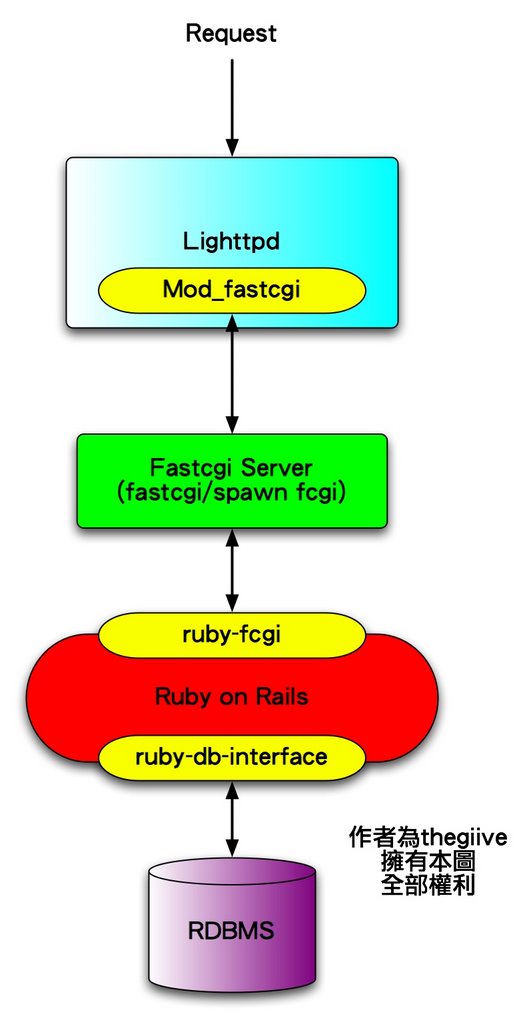
本來不想寫的,不過看到 這篇 ,想說還是得寫寫一些最基本的步驟,怎麼安裝就看你的 OS 的套件摟。Lighttpd + Fastcgi + Ruby on Rails + RDBMS 的情況如下圖,一共有兩個 interface
  1. Lighttpd 藉由 mod_fastcgi 跟 fasctcgi server 溝通
  2. 而 Ruby 藉由 ruby-fcgi 跟 fastcgi server 溝通
fastcgi server 是獨立 process ,可以跑 unix socket 或是 TCP socket ( spawn fcgi)。所以安裝步驟為
  1. 安裝 lighttpd (預設已經包含 mod_fastcgi )
  2. 安裝 fastcgi
  3. 安裝 ruby-fcgi
  4. 安裝 Ruby on Rails
  5. 設定 lighttpd config
  • 安裝 lighttpd 很簡單,參照網路上的說明很多,這是官方網站
  • 安裝 fastcgi 比較麻煩,但是也沒多麻煩,許多 OS 已經有套件直接安裝,這是官方網站
  • 安裝ruby-fcgi 有很多方式,用 gems 可以,打入 gem install fcgi -y 即可。用其他套件管理系統也可以安裝。要測試有沒有裝好也很簡單,irb 底下打 require 'fcgi' 就知道有沒有成功。至於 gem 不能安裝的問題,如果是 FreeBSD 可以試試看這裡吧,可能有幫助
  • 安裝 Ruby on Rails 就用 gems 吧,gem install rails -y 即可
  • 設定 lighttpd config 就使用我說的 這兩個連結 ,不同 Domain , 相同Domain , 圖片的路徑問題我會再 check

9/28/2006

Lighttpd 防止圖片盜連

說實在話,我這個 Blog 趨向 Ruby and Rails 的程度遠比Lighttpd 或是 SQLite 來得深 @@!
不過我的 MAC OS X 上面依舊還是靠這個組合跑得很開心
所以我要努力充實 SQLite 跟 Lighttpd 的觀念,VIVA~~~

今天看到 我 BlogLines 裡面被歸類為 IT 強者分類的 DK大大大丟出了一篇文章
發現剛好解決我最近一個小問題
趕緊記下來以免忘記

Lighttpd 防止圖片盜連
Just put $HTTPurl inside $HTTPreferer ,and $HTTPurl must be allways the last, at least in 1.4.x

因為 Lighttpd 設計上面的哲學,所以他不能將 http["url"] 放在 http["referer"] 的外面

在 Lighttpd Trac 上面的解答

$HTTP["referer"] !~ "^($|http://www\.fussball-forum\.de)" {
$HTTP["url"] =~ "^/images/" {
url.access-deny = ( ".jpg", ".jpeg", ".png", ".gif" )
}
}

9/14/2006

lighttpd 跑 Rails 設定

最簡單的方式

其實Rails 自己就有附設定檔,如果你不想自己寫那麼多設定,只想用 lighttpd 跑 Rails。您首先要確定您這個 user 擁有可以使用 lighttpd 的權限 ,然後在 Rails 資料夾下打
ruby script/server
他應該就會直接使用 lighttpd,下面是啟動 lighttpd 正常的message
=> Booting lighttpd (use 'script/server webrick' to force WEBrick)
=> Rails application started on http://0.0.0.0:3000
=> Call with -d to detach
=> Ctrl-C to shutdown server (see config/lighttpd.conf for options)
如果出現下面的message,代表只有啟動 Webrick
=> Booting WEBrick...
=> Rails application started on http://0.0.0.0:3000
=> Ctrl-C to shutdown server; call with --help for options
那通常就是您這個 user 不可以使用 lighttpd 的權限
打入
ruby script/server lighttpd

這個指令強制使用 lighttpd ,用於 Debug 用途。並且會將 lighttpd config copy 一份到rails 資料匣下面的 conf/lighttpd.conf ,config 預設 port 是 3000,如果你想要直接用 port 80,可以到裡面把改成
server.port = 80

詳細的方式

Var 的部份
var.railsbasedir = '/rails/root/dir/'
這裡是設定 config 檔的變數,以後修改位置改這裡就好了

Server Port的部份

server.bind = "1.2.3.4"
server.port = 3000
Server.bind 就是server 的 ip,server.port 就是lighttpd listen 的 port。

Modules 的部份
server.modules = ( "mod_rewrite", "mod_accesslog", "mod_fastcgi","mod_compress", "mod_expire" )
這裡是相關一定要enable的 Modules


其他設定的部份
# Ruby on Rails Config
server.error-handler-404 = "/dispatch.fcgi"
server.document-root = var.railsbasedir + "/public/"
server.errorlog = var.railsbasedir + "/log/lighttpd.error.log"
accesslog.filename = var.railsbasedir + "/log/lighttpd.access.log"

url.rewrite = ( "^/$" => "index.html", "^([^.]+)$" => "$1.html" )

compress.filetype = ( "text/plain", "text/html", "text/css", "text/javascript" )
compress.cache-dir = var.railsbasedir + "/tmp/cache"

expire.url = ( "/favicon.ico" => "access 3 days",
"/images/" => "access 3 days",
"/stylesheets/" => "access 3 days",
"/javascripts/" => "access 3 days"
)

fastcgi.server = (
".fcgi" => ( "localhost" => (
"min-procs" => 1,
"max-procs" => 3,
"socket" => var.railsbasedir + "/tmp/sockets/fcgi.socket",
"bin-path" => var.railsbasedir + "/public/dispatch.fcgi",
"bin-environment" => ( "RAILS_ENV" => "development" )
)))

$HTTP["useragent"] =~ "^(.*MSIE.*)|(.*AppleWebKit.*)$" {
server.max-keep-alive-requests = 0
}

有幾個地方可以注意
  1. var.railsbasedir的部份只是因為以後搬目錄方便設定,其實那裡都可以用絕對路徑設定
  2. "min-procs" => 1, "max-procs" => 3 代表最少fastcgi process 一個,最多三個
  3. "bin-environment" => ( "RAILS_ENV" => "development" ) 代表現在 rails 是啟動 development 的環境,可以轉成 production 跟 test

9/13/2006

Lighttpd 的 Rails加 PHP 設定 (相同 Domain不同目錄)

我上一篇介紹了不同 Domain 的 Rails 加 PHP 設定。而根據Syschen這篇文章,裡面介紹了 Single Domain 不同 web dir的設定方式,實在受益良多。但是根據 ihower 的回報
成功跑起來之後,我發現 public 裡面的css跟圖片連結等還是不對。
我嘗試了一下,當我將一個跑 Multi Domain 的 Lighttpd 改成單一 Domain ,將一個原本顯示好好的圖片,像是 http://rails.host.com/images/abc.jpg 改成了 http://rails.host.com/rails/images/abc.jpg 之後,然後 reload,他會出現

Routing Error

Recognition failed for "/rails/images/logo_friends.gif"
恩,很明顯出現上面 ihower 兄講的問題。根據 PTT 版友 tka  提示我
小弟 亦遇此問題 經由google搜尋後
自中這個網頁獲得解答
關鍵在於 alias.url 這個設定值 若依照該網頁之方式設定 便可得到 正常的結果
所以我仔細看了一下這個網頁,簡單列出幾個重點,除了我上一篇的重點外,還要加上 alias.url 才可正常 work

Lighttpd Conf

var 部份一樣加入一個 var.railsbasedir
var.railsbasedir = "/var/www/friends.roodo.com/rail1/"

Modules 要加上 mod_fastcgi , mod_rewrite, mod_redirect , mod_alias
server.modules += ("mod_fastcgi" , "mod_rewrite", "mod_redirect" , "mod_alias")

index file 要加上 dispatch.fcgi
index-file.names = ( "index.php", "index.html","index.htm", "default.htm", "dispatch.fcgi" )
Virtual Domain 要改成 目錄設定
$HTTP["url"] =~ "^/rails/" {
include 'rails.conf'
}

$HTTP["url"] =~ "^/php/" {
include 'php.conf'
}
rails.conf 等下就會講到怎麼寫,php.conf 可以看 Lighttpd 的 Rails and PHP 設定 (不同 Domain ) 寫法

在 lighttpd config 底下新開一個 Rails.conf

我加入了 alias.url
server.document-root = var.railsbasedir+"public/"
alias.url = ( "/rails/" => var.railsbasedir+"public/" )
server.error-handler-404 = "/dispatch.fcgi"
server.indexfiles = ( "dispatch.fcgi", "index.html" )
fastcgi.server = ( ".fcgi" =>
( "localhost" =>
(
"min-proc" => 1,
"max-proc" => 1,
"socket" => var.railsbasedir+"tmp/app1-fastcgi.socket",
"bin-path" => var.railsbasedir+"public/dispatch.fcgi",
"bin-environment" => ( "RAILS_ENV" => "development" )
)
)
)


Rails Routing Config

修改 conf/route.rb,告訴 Rails 您處於 http://www.abc.com/rails/ 底下
map.connect 'rails/:controller/service.wsdl', :action => 'wsdl'
map.connect 'rails/:controller/:action/:id'

顯示結果

如此當我將一個原本顯示好好的圖片,像是 http://rails.host.com/images/abc.jpg 改成了 http://rails.host.com/rails/images/abc.jpg 之後,他的確可以正常顯示了。

不過,我程式所有的圖片路徑都是直接指定 img src="/images/abc.jpg",所以我的程式裡面的圖片完全無法正確顯示,所以我的程式寫法是無法從 Multi Domain 改成 Signal Domain 的。解決方式就是在 helper 裡面,將所有圖片顯示的地方都用 helper 來幫我顯示。

延伸閱讀
  1. 這裡有一份 Apache + Reverse Proxy + Mongrel 的相同 Domain 不同目錄的設定方式

Lighttpd 的 Rails and PHP 設定 (不同 Domain )

Rails 跑在 Lighttpd 上面的設定一向不簡單,尤其是可以同時跑 PHP 跟 Rails 的設定更是麻煩,下面我參考 Rails 內附的 lighttpd 修改出相關的設定檔。我是使用 不同 domain 來區別 fastcgi 的設定。
  • Rails Domain 是 rails.example.com
  • PHP Domain 是 php.example.com
Rails + PHP 的 lighttpd 設定檔

Var 的部份
var.railsbasedir = '/rails/root/dir/'

Modules 的部份
server.modules = ( "mod_rewrite", "mod_accesslog", "mod_fastcgi", "mod_compress", "mod_expire" )

Virtual Host Rails 的部份

$HTTP["host"] == "rails.example.com" {

# Ruby on Rails Config

server.error-handler-404 = "/dispatch.fcgi"
server.document-root = var.railsbasedir + "/public/"
server.errorlog = var.railsbasedir + "/log/lighttpd.error.log"
accesslog.filename = var.railsbasedir + "/log/lighttpd.access.log"
url.rewrite = ( "^/$" => "index.html", "^([^.]+)$" => "$1.html" )
compress.filetype = ( "text/plain", "text/html", "text/css", "text/javascript" )
compress.cache-dir = var.railsbasedir + "/tmp/cache"
expire.url = ( "/favicon.ico" => "access 3 days",
"/images/" => "access 3 days",
"/stylesheets/" => "access 3 days",
"/javascripts/" => "access 3 days" )


fastcgi.server = ( ".fcgi" => ( "localhost" => (
"min-procs" => 1,
"max-procs" => 3,
"socket" => var.railsbasedir + "/tmp/sockets/fcgi.socket",
"bin-path" => var.railsbasedir + "/public/dispatch.fcgi",
"bin-environment" => ( "RAILS_ENV" => "development" )
}

Virtual Host PHP 的部份

$HTTP["host"] == "php.example.com" {
# PHP mod_fastcgi config
server.document-root = "/php/doc/root/dir"
fastcgi.server = ( ".php" =>
( "localhost" =>
(
"host" => "61.218.90.243",
"port" => 1026,
"bin-path" => "/usr/bin/php-cgi",
"min-procs" => 1,
"max-procs" => 1,
)
)
)
}


要注意的部份

有幾個地方可以微調
  1. var.railsbasedir 填入你的 rails 的 base dir
  2. "min-procs" => 1, "max-procs" => 3 代表最少fastcgi process 一個,最多三個
  3. "bin-environment" => ( "RAILS_ENV" => "development" ) 代表現在 rails 是啟動 development 的環境,可以轉成 production 跟 test

9/02/2006

lighttpd mod_rewrite 寫法

lighttpd mod_rewrite 的用法


virtual host


$HTTP["host"] == "www.abc.com" {
server.document-root = "/var/www/www.abc.com/htdocs/"
}

如此所有連到 www.abc.com 的 doc root 都指到 /var/www/www.abc.com/htdocs/


Mod_write


$HTTP["host"] == "www.abc.com" {
url.redirect = ("^/(.*)" => "http://abc.roodo.com/$1" )
}


如此所有連到 http://www.abc.com 都會被轉變成 http://abc.roodo.com/ 的網址
像是 http://www.abc.com/fourm/index.php -> http://abc.roodo.com/fourm/index.php

8/26/2006

lighttpd mod_auth 使用方式

本網頁取自 此頁
記載著 lighttpd 的 auth 方式
當你研發一個網頁時 , 你通常需要 auth 來保證你的研發機密不會被 Google 找到 XD
lighttpd config
  • 在 lighttpd.conf 加入 mod_auth

  • 在 mod_auth 裡面加入
    auth.debug = 2
    auth.backend = “plain”
    auth.backend.plain.userfile = “/home/lighttpd/.lighttpdpassword”

    裡面的 auth.backend.plain.userfile = “/home/lighttpd/.lighttpdpassword”
    代表 password放置的放置的 file location

  • 加入
    auth.require = ( “/docs/” =>
    (
    “method” => “basic”,
    “realm” => “Password protected area”,
    “require” => “user=aaa”
    )
    )

    “require” => “user=aaa”代表 /doc 只有 aaa 這個人可以登入


建立 password file
vi /home/lighttpd/.lighttpdpassword
在裡面寫入

aaa=password


並且將這個 file 設為只有 lighttpd 可以讀

一開始 Application Error 的問題

當你在開發Rails 程式的時候,突然會發現『疑,他不動了』...畫面上還出現
Application error

Change this error message for exceptions thrown outside of an action (like in Dispatcher setups or broken Ruby code) in public/500.html
假設一開始初始化你的 Project ,就有 Application Error 問題,通常問題是出現在
  • 權限
  • Ruby on Rails 的環境架設錯誤
這兩個部份。權限部份請確定你的 log/ tmp/ 資料夾權限都是可讀寫,並且請確認你跑的 Web Server 可以讀寫到這兩個資料夾。意思就是說,如果當你使用 lighttpd ,系統通常都會用 lighttpd 這個 user 來啟動 lighttpd,請確認 lighttpd 這個 user 是否可以讀寫 log/ tmp/ 。如果你使用 webrick,你只要確認你現在使用者有權限可以讀寫即可。

如果你對於我講的話霧撒撒的,一個小建議是你先一開重新建立一個新的 Rails 資料夾
rails test
進入這個資料夾,不要切換任何使用者,強迫使用 Webrick 啟動
ruby script/server webrick
之所以要這麼作是因為 script/server 會偵測有沒有 lighttpd ,如果有就會自動改成 lighttpd 啟動。只有在後面加入 webrick ,才會強迫使用 webrick 來啟動 Rails 。通常只要這樣作,絕對沒有權限的問題。

你可以試試看使用 webrick 開啟可不可以動,如果用 webrick 可以用,但是 apache 或是 lighttpd 不可以用,很有可能是lighttpd 或是 apache 沒有存取 tmp/ log/ 的權限問題。

解決方式:

你可以試試看,將 rails 目錄下面的 tmp 目錄修改權限(就是改成web server 的使用者,這裡的範例是 lighttpd )
chonw -R lighttpd tmp/ log/